| 123456789101112131415161718192021222324252627282930313233343536373839404142434445464748495051525354555657585960616263646566676869707172737475767778798081828384858687888990919293949596979899100101102103104105106107108109110111112113114115116117118119120121122123124125126127128129130131132133134135136137138139140141142143144145146147148149150151152153154155156157158159160161162163164165166167168169170171172173174175176177178179180181182183184185186187188189190191192193194195196197198199200201202203204205206207208209210211212213214215216217218219220221222223224225226227228229230231232233234235236237238239240241242243244245246247248249250251252253254255256257258259260261262263264265266267268269270271272273274275276277278279280281282283284285286287288289290291292293294295296297298299300301302303304305306307308309310311312313314315316317318319320321322323324325326327328329330331332333334335336337338339340341342343344345346347348349350351352353354355356357358359360361362363364365366367368369370371372373374375376377378379380381382383384385386387388389390391392393394395396397398399400401402403404405406407408409410411412413414415416417418419420421422423424425426427428429430431432433434435436437438439440441442443444445446447448449450451452453454455456457458459460461462463464465466467468469470471472473474475476477478479480481482483484485486487488489490491492493494495496497498499500501502503504505506507508509510511512513514515516517518519520521522523524525526527528529530531532533534535536537538539540541542543544545546547548549550551552553554555556557558559560561562563564565566567568569570571572573574575576577578579580581582583584585586587588589590591592593594595596597598599600601602603604605606607608609610611612613614615616617618619620621622623624625626627628629630631632633634635636637638639640641642643644645646647648649650651652653654655656657658659660661662663664665666667668669670671672673674675676677678679680681682683684685686687688689690691692693694695696697698699700701702703704705706707708709710711712713714715716717718719720721722723724725726727728729730731732733734735736737738739740741742743744745746747748749750751752753754755756757758759760761762763764765766767768769770771772773774775776777778779780781782783784785786787788789790791792793794795796797798799800801802803804805806807808809810811812813814815816817818819820821822823824825826827828829830831832833834835836837838839840841842843844845846847848849850851852853854855856857858859860861862863864865866867868869870871872873874875876877878879880881882883884885886887888889890891892893894895896897898899900901902903904905906907908909910911912913914915916917918919920921922923924925926927928929930931932933934935936937938939940941942943944945946947948949950951952953954955956957958959960961962963964965966967968969970971972973974975976977978979980981982983984985986987988989990991992993994995996997998999100010011002100310041005100610071008100910101011101210131014101510161017101810191020102110221023102410251026102710281029103010311032103310341035103610371038103910401041104210431044104510461047104810491050105110521053105410551056105710581059106010611062106310641065106610671068106910701071107210731074107510761077107810791080108110821083108410851086108710881089109010911092109310941095109610971098109911001101110211031104110511061107110811091110111111121113111411151116111711181119112011211122112311241125112611271128112911301131113211331134113511361137113811391140114111421143114411451146114711481149115011511152115311541155115611571158115911601161116211631164116511661167116811691170117111721173117411751176117711781179118011811182118311841185 |
- <!DOCTYPE html>
- <html>
- <head>
- <title>Deep Learning in R</title>
- <meta charset="utf-8">
- <meta name="author" content="metya" />
- <meta name="date" content="2018-12-08" />
- <link href="libs/pagedtable/css/pagedtable.css" rel="stylesheet" />
- <script src="libs/pagedtable/js/pagedtable.js"></script>
- <script src="libs/htmlwidgets/htmlwidgets.js"></script>
- <script src="libs/jquery/jquery.min.js"></script>
- <link href="libs/leaflet/leaflet.css" rel="stylesheet" />
- <script src="libs/leaflet/leaflet.js"></script>
- <link href="libs/leafletfix/leafletfix.css" rel="stylesheet" />
- <script src="libs/Proj4Leaflet/proj4-compressed.js"></script>
- <script src="libs/Proj4Leaflet/proj4leaflet.js"></script>
- <link href="libs/rstudio_leaflet/rstudio_leaflet.css" rel="stylesheet" />
- <script src="libs/leaflet-binding/leaflet.js"></script>
- <link href="libs/datatables-css/datatables-crosstalk.css" rel="stylesheet" />
- <script src="libs/datatables-binding/datatables.js"></script>
- <link href="libs/dt-core/css/jquery.dataTables.min.css" rel="stylesheet" />
- <link href="libs/dt-core/css/jquery.dataTables.extra.css" rel="stylesheet" />
- <script src="libs/dt-core/js/jquery.dataTables.min.js"></script>
- <link href="libs/crosstalk/css/crosstalk.css" rel="stylesheet" />
- <script src="libs/crosstalk/js/crosstalk.min.js"></script>
- <link rel="stylesheet" href="xaringan-themer.css" type="text/css" />
- </head>
- <body>
- <textarea id="source">
- class: center, middle, inverse, title-slide
- # Deep Learning in R
- ## ░ <br/>Обзор фреймворков с примерами
- ### metya
- ### 2018-12-08
- ---
- class: center, middle
- background-color: #8d6e63
- #Disclaimer
- Цель доклада не дать понимаение что такое глубокое обучение и детально разобрать как работать с ним и обучать современные модели, а скорее показать как просто можно начать тем, кто давно хотел и чесались руки, но все было никак не взяться
- ---
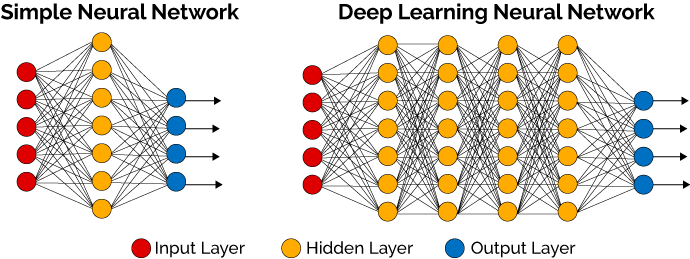
- # Deep Learning
- ## Что это?
- --
- * Когда у нас есть исскуственная нейронная сеть
- --
- * Когда скрытых слоев в этой сети больше чем два
- --
- 
- .footnotes[[1] https://machinelearningmastery.com/what-is-deep-learning/]
- ---
- ## Как это математически
- 
- ???
- На самом деле это конечно самый простой юнит, самый базовый.
- ---
- background-image: url(https://3qeqpr26caki16dnhd19sv6by6v-wpengine.netdna-ssl.com/wp-content/uploads/2016/08/Why-Deep-Learning-1024x742.png)
- ???
- Image credit: [Andrew Ng](http://www.slideshare.net/ExtractConf)
- ---
- class: inverse, center, middle, title-slide
- # Frameworks
- ---
- 
- .footnotes[
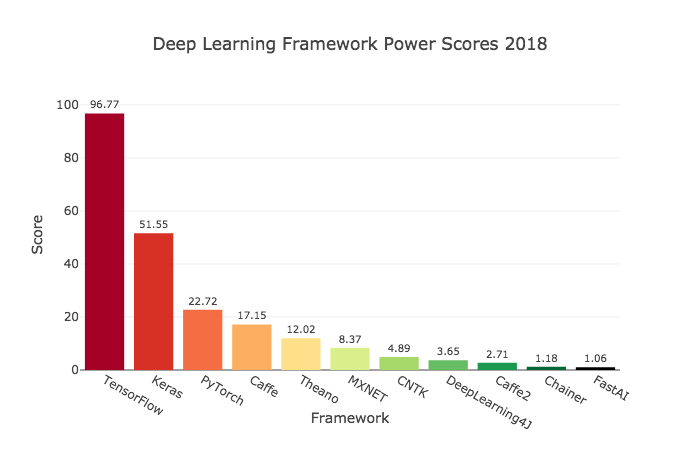
- [1] https://towardsdatascience.com/deep-learning-framework-power-scores-2018-23607ddf297a
- ]
- ---
- ## Нас интересуют только те, что есть в R через API
- --
- * ###TensorFlow
- --
- * ###theano
- --
- * ###Keras
- --
- * ###CNTK
- --
- * ###MXNet
- --
- * ###ONNX
- ---
- ## Есть еше несколько пакетов
- * darch (removed from cran)
- * deepnet
- * deepr
- * H2O (interface) ([Tutorial](https://htmlpreview.github.io/?https://github.com/ledell/sldm4-h2o/blob/master/sldm4-deeplearning-h2o.html))
- ???
- Вода это по большей части МЛ фреймворк, с недавних пор, где появился модуль про глубокое обучение. Есть неплохой туториал для р пакета. Умеет в поиск гиперпараметров, кроссвалидацию и прочие нужные для МЛ штуки для сеток, очевидно это работает только для маленьких сетей)
- Но они р специфичны, кроме воды, и соотвественно медленные, да и умеют довольно мало. Новые годные архитектуры сетей туда не имплементированы.
- ---
- 
- https://www.tensorflow.org/
- https://tensorflow.rstudio.com/
- - Делает Google
- - Самый популярный, имеет тучу туториалов и книг
- - Имеет самый большой спрос у продакшн систем
- - Имеет API во множестве языков
- - Имеет статический граф вычислений, что бывает неудобно, зато оптимизированно
- - Примерно с лета имеет фичу **eager execution**, который почти нивелирует это неудобство. Но почти не считается
- - Доступен в R как самостоятельно, так и как бэкэнд Keras
- ---
- 
- http://www.deeplearning.net/software/theano/
- - Делался силами университета Монреаль с 2007
- - Один из самый старых фреймворков, но почти почил в забытьи
- - Придумали идею абстракции вычислительных графов (статических) для оптимизации и вычисления нейронных сетей
- - В R доступен как бэкенд через Keras
- ---
- 
- https://cntk.ai/
- - Делается силами Майкрософт
- - Имеет половинчатые динамические вычислительные графы (на самом деле динамические тензоры скорее)
- - Доступен как бэкенд Keras так и как самостоятельный бэкенд с биндингами в R через reticulate package, что значит нужно иметь python версию фреймворка
- ---
- 
- https://keras.io/
- https://keras.rstudio.com/
- https://tensorflow.rstudio.com/keras/
- - Высокоуровневый фреймворк над другими такими бэкэндами как Theano, CNTK, Tensorflow, и еще некоторые на подходе
- - Делается Франсуа Шолле, который написал книгу Deep Learning in R
- - Очень простой код
- - Один и тот же код рабоает на разных бэкендах, что теоретически может быть полезно (нет)
- - Есть очень много блоков нейросетей из современных SOTA работ
- - Нивелирует боль статических вычислительных графов
- - Уже давно дефолтом поставляется вместе с TensorFlow как его часть, но можно использовать и отдельно
- ---
- <img src="https://raw.githubusercontent.com/dmlc/dmlc.github.io/master/img/logo-m/mxnetR.png" style=width:30% />
- https://mxnet.apache.org/
- https://github.com/apache/incubator-mxnet/tree/master/R-package
- - Является проектом Apache
- - Сочетает в себе динамические и статические графы
- - Тоже имеет зоопарк предобученных моделей
- - Как и TensorFlow поддерживается многими языками, что может быть очень полезно
- - Довольно разумный и хороший фреймворк, непонятно, почему не пользуется популярностью
- ---
- 
- https://onnx.ai/
- https://onnx.ai/onnx-r/
- - Предоставляет открытый формат представления вычислительных графов, чтобы можно было обмениваться запускать одни и теже, экспортированные в этот формат, модели с помощью разных фреймворков и своего рантайма
- - Можно работать из R
- - Изначально делался Microsoft вместе с Facebook
- - Поддерживает кучу фреймворков нативно и конвертацию в ML и TF, Keras
- ---
- class: inverse, middle, center
- # Deep Learning with MXNet
- ---
- ## Установка
- В Windows и MacOS в R
- ```r
- # Windows and MacOs
- cran <- getOption("repos")
- cran["dmlc"] <- "https://apache-mxnet.s3-accelerate.dualstack.amazonaws.com/R/CRAN/GPU/cu92"
- options(repos = cran)
- install.packages("mxnet")
- ```
- Linux bash
- ```bash
- # On linux
- git clone --recursive https://github.com/apache/incubator-mxnet.git mxnet
- cd mxnet/docs/install
- ./install_mxnet_ubuntu_python.sh
- ./install_mxnet_ubuntu_r.sh
- cd incubator-mxnet
- make rpkg
- ```
- ---
- ## Загрузка и обработка данных
- ```r
- df <- read_csv("data.csv")
- set.seed(100)
- ```
- ```r
- #transform and split train on x and y
- train_ind <- sample(1:77, 60)
- x_train <- as.matrix(df[train_ind, 2:8])
- y_train <- unlist(df[train_ind, 9])
- x_val <- as.matrix(df[-train_ind, 2:8])
- y_val <- unlist(df[-train_ind, 9])
- ```
- ---
- ## Задания архитектуры сети
- ```r
- require(mxnet)
- # define graph
- data <- mx.symbol.Variable("data")
- fc1 <- mx.symbol.FullyConnected(data, num_hidden = 1)
- linreg <- mx.symbol.LinearRegressionOutput(fc1)
- # define learing parameters
- initializer <- mx.init.normal(sd = 0.1)
- optimizer <- mx.opt.create("sgd",
- learning.rate = 1e-6,
- momentum = 0.9)
- # define logger
- logger <- mx.metric.logger()
- epoch.end.callback <- mx.callback.log.train.metric(
- period = 4, # число батчей, после которого оценивается метрика
- logger = logger)
- # num of epoch
- n_epoch <- 20
- ```
- ---
- ## Построим граф модели
- ```r
- # plot our model
- graph.viz(linreg)
- ```
- <img src="Deep_Learning_in_R_files/graph.png" style="width:50%" >
- ---
- ## Обучим
- ```r
- model <- mx.model.FeedForward.create(
- symbol = linreg, # our model
- X = x_train, # our data
- y = y_train, # our label
- ctx = mx.cpu(), # engine
- num.round = n_epoch,
- initializer = initializer, # inizialize weigths
- optimizer = optimizer, # sgd optimizer
- eval.data = list(data = x_val, label = y_val), # evaluation on evey epoch
- eval.metric = mx.metric.rmse, # metric
- array.batch.size = 15,
- epoch.end.callback = epoch.end.callback) # logger
- ```
- ```
- ## Warning in mx.model.select.layout.train(X, y): Auto detect layout of input matrix, use rowmajor..
- ```
- ```
- ## Start training with 1 devices
- ```
- ```
- ## [1] Train-rmse=7.85010987520218
- ```
- ```
- ## [1] Validation-rmse=7.99821019172668
- ```
- ```
- ## [2] Train-rmse=9.21365368366241
- ```
- ```
- ## [2] Validation-rmse=4.74030923843384
- ```
- ```
- ## [3] Train-rmse=4.16309010982513
- ```
- ```
- ## [3] Validation-rmse=7.18643116950989
- ```
- ```
- ## [4] Train-rmse=5.20915931463242
- ```
- ```
- ## [4] Validation-rmse=3.87698078155518
- ```
- ```
- ## [5] Train-rmse=4.94802039861679
- ```
- ```
- ## [5] Validation-rmse=3.80227029323578
- ```
- ```
- ## [6] Train-rmse=2.69853216409683
- ```
- ```
- ## [6] Validation-rmse=3.90478467941284
- ```
- ```
- ## [7] Train-rmse=3.52689051628113
- ```
- ```
- ## [7] Validation-rmse=2.31562197208405
- ```
- ```
- ## [8] Train-rmse=2.99551945924759
- ```
- ```
- ## [8] Validation-rmse=2.93496096134186
- ```
- ```
- ## [9] Train-rmse=2.22769635915756
- ```
- ```
- ## [9] Validation-rmse=2.37067186832428
- ```
- ```
- ## [10] Train-rmse=2.5699103474617
- ```
- ```
- ## [10] Validation-rmse=1.86853647232056
- ```
- ```
- ## [11] Train-rmse=2.24543181061745
- ```
- ```
- ## [11] Validation-rmse=2.3385466337204
- ```
- ```
- ## [12] Train-rmse=2.03947871923447
- ```
- ```
- ## [12] Validation-rmse=1.82985359430313
- ```
- ```
- ## [13] Train-rmse=2.111790984869
- ```
- ```
- ## [13] Validation-rmse=1.74209445714951
- ```
- ```
- ## [14] Train-rmse=1.98190069198608
- ```
- ```
- ## [14] Validation-rmse=1.98799872398376
- ```
- ```
- ## [15] Train-rmse=1.9320664703846
- ```
- ```
- ## [15] Validation-rmse=1.68956047296524
- ```
- ```
- ## [16] Train-rmse=1.91881200671196
- ```
- ```
- ## [16] Validation-rmse=1.68268179893494
- ```
- ```
- ## [17] Train-rmse=1.87585905194283
- ```
- ```
- ## [17] Validation-rmse=1.79575181007385
- ```
- ```
- ## [18] Train-rmse=1.85955160856247
- ```
- ```
- ## [18] Validation-rmse=1.64644628763199
- ```
- ```
- ## [19] Train-rmse=1.83187100291252
- ```
- ```
- ## [19] Validation-rmse=1.63903748989105
- ```
- ```
- ## [20] Train-rmse=1.81522011756897
- ```
- ```
- ## [20] Validation-rmse=1.68724113702774
- ```
- ---
- ## Построим кривую обучения
- ```r
- rmse_log <- data.frame(RMSE = c(logger$train, logger$eval),dataset = c(rep("train", length(logger$train)), rep("val", length(logger$eval))),epoch = 1:n_epoch)
- library(ggplot2)
- ggplot(rmse_log, aes(epoch, RMSE, group = dataset, colour = dataset)) + geom_point() + geom_line()
- ```
- <!-- -->
- ---
- class: inverse, center, middle
- # Deep Learning with Keras
- ---
- ## Установка
- ```r
- install.packages("keras")
- keras::install_keras(tensorflow = 'gpu')
- ```
- ### Загрузка нужных нам пакетов
- ```r
- require(keras) # Neural Networks
- require(tidyverse) # Data cleaning / Visualization
- require(knitr) # Table printing
- require(rmarkdown) # Misc. output utilities
- require(ggridges) # Visualization
- ```
- ---
- ## Загрузка данных
- ```r
- activityLabels <- read.table("Deep_Learning_in_R_files/HAPT Data Set/activity_labels.txt",
- col.names = c("number", "label"))
- activityLabels %>% kable(align = c("c", "l"))
- ```
- number label
- -------- -------------------
- 1 WALKING
- 2 WALKING_UPSTAIRS
- 3 WALKING_DOWNSTAIRS
- 4 SITTING
- 5 STANDING
- 6 LAYING
- 7 STAND_TO_SIT
- 8 SIT_TO_STAND
- 9 SIT_TO_LIE
- 10 LIE_TO_SIT
- 11 STAND_TO_LIE
- 12 LIE_TO_STAND
- ---
- ```r
- labels <- read.table("Deep_Learning_in_R_files/HAPT Data Set/RawData/labels.txt",
- col.names = c("experiment", "userId", "activity", "startPos", "endPos"))
- dataFiles <- list.files("Deep_Learning_in_R_files/HAPT Data Set/RawData")
- labels %>%
- head(50) %>%
- paged_table()
- ```
- <div data-pagedtable="false">
- <script data-pagedtable-source type="application/json">
- {"columns":[{"label":[""],"name":["_rn_"],"type":[""],"align":["left"]},{"label":["experiment"],"name":[1],"type":["int"],"align":["right"]},{"label":["userId"],"name":[2],"type":["int"],"align":["right"]},{"label":["activity"],"name":[3],"type":["int"],"align":["right"]},{"label":["startPos"],"name":[4],"type":["int"],"align":["right"]},{"label":["endPos"],"name":[5],"type":["int"],"align":["right"]}],"data":[{"1":"1","2":"1","3":"5","4":"250","5":"1232","_rn_":"1"},{"1":"1","2":"1","3":"7","4":"1233","5":"1392","_rn_":"2"},{"1":"1","2":"1","3":"4","4":"1393","5":"2194","_rn_":"3"},{"1":"1","2":"1","3":"8","4":"2195","5":"2359","_rn_":"4"},{"1":"1","2":"1","3":"5","4":"2360","5":"3374","_rn_":"5"},{"1":"1","2":"1","3":"11","4":"3375","5":"3662","_rn_":"6"},{"1":"1","2":"1","3":"6","4":"3663","5":"4538","_rn_":"7"},{"1":"1","2":"1","3":"10","4":"4539","5":"4735","_rn_":"8"},{"1":"1","2":"1","3":"4","4":"4736","5":"5667","_rn_":"9"},{"1":"1","2":"1","3":"9","4":"5668","5":"5859","_rn_":"10"},{"1":"1","2":"1","3":"6","4":"5860","5":"6786","_rn_":"11"},{"1":"1","2":"1","3":"12","4":"6787","5":"6977","_rn_":"12"},{"1":"1","2":"1","3":"1","4":"7496","5":"8078","_rn_":"13"},{"1":"1","2":"1","3":"1","4":"8356","5":"9250","_rn_":"14"},{"1":"1","2":"1","3":"1","4":"9657","5":"10567","_rn_":"15"},{"1":"1","2":"1","3":"1","4":"10750","5":"11714","_rn_":"16"},{"1":"1","2":"1","3":"3","4":"13191","5":"13846","_rn_":"17"},{"1":"1","2":"1","3":"2","4":"14069","5":"14699","_rn_":"18"},{"1":"1","2":"1","3":"3","4":"14869","5":"15492","_rn_":"19"},{"1":"1","2":"1","3":"2","4":"15712","5":"16377","_rn_":"20"},{"1":"1","2":"1","3":"3","4":"16530","5":"17153","_rn_":"21"},{"1":"1","2":"1","3":"2","4":"17298","5":"17970","_rn_":"22"},{"1":"2","2":"1","3":"5","4":"251","5":"1226","_rn_":"23"},{"1":"2","2":"1","3":"7","4":"1227","5":"1432","_rn_":"24"},{"1":"2","2":"1","3":"4","4":"1433","5":"2221","_rn_":"25"},{"1":"2","2":"1","3":"8","4":"2222","5":"2377","_rn_":"26"},{"1":"2","2":"1","3":"5","4":"2378","5":"3304","_rn_":"27"},{"1":"2","2":"1","3":"11","4":"3305","5":"3572","_rn_":"28"},{"1":"2","2":"1","3":"6","4":"3573","5":"4435","_rn_":"29"},{"1":"2","2":"1","3":"10","4":"4436","5":"4619","_rn_":"30"},{"1":"2","2":"1","3":"4","4":"4620","5":"5452","_rn_":"31"},{"1":"2","2":"1","3":"9","4":"5453","5":"5689","_rn_":"32"},{"1":"2","2":"1","3":"6","4":"5690","5":"6467","_rn_":"33"},{"1":"2","2":"1","3":"12","4":"6468","5":"6709","_rn_":"34"},{"1":"2","2":"1","3":"1","4":"7624","5":"8252","_rn_":"35"},{"1":"2","2":"1","3":"1","4":"8618","5":"9576","_rn_":"36"},{"1":"2","2":"1","3":"1","4":"9991","5":"10927","_rn_":"37"},{"1":"2","2":"1","3":"1","4":"11311","5":"12282","_rn_":"38"},{"1":"2","2":"1","3":"3","4":"13129","5":"13379","_rn_":"39"},{"1":"2","2":"1","3":"3","4":"13495","5":"13927","_rn_":"40"},{"1":"2","2":"1","3":"2","4":"14128","5":"14783","_rn_":"41"},{"1":"2","2":"1","3":"3","4":"15037","5":"15684","_rn_":"42"},{"1":"2","2":"1","3":"2","4":"15920","5":"16598","_rn_":"43"},{"1":"2","2":"1","3":"3","4":"16847","5":"17471","_rn_":"44"},{"1":"2","2":"1","3":"2","4":"17725","5":"18425","_rn_":"45"},{"1":"3","2":"2","3":"5","4":"298","5":"1398","_rn_":"46"},{"1":"3","2":"2","3":"7","4":"1399","5":"1555","_rn_":"47"},{"1":"3","2":"2","3":"4","4":"1686","5":"2627","_rn_":"48"},{"1":"3","2":"2","3":"8","4":"2628","5":"2769","_rn_":"49"},{"1":"3","2":"2","3":"5","4":"2770","5":"3904","_rn_":"50"}],"options":{"columns":{"min":{},"max":[10]},"rows":{"min":[10],"max":[10]},"pages":{}}}
- </script>
- </div>
- ---
- ```r
- fileInfo <- data_frame(
- filePath = dataFiles
- ) %>%
- filter(filePath != "labels.txt") %>%
- separate(filePath, sep = '_',
- into = c("type", "experiment", "userId"),
- remove = FALSE) %>%
- mutate(
- experiment = str_remove(experiment, "exp"),
- userId = str_remove_all(userId, "user|\\.txt")
- ) %>%
- spread(type, filePath)
- fileInfo %>% head() %>% kable()
- ```
- experiment userId acc gyro
- ----------- ------- --------------------- ----------------------
- 01 01 acc_exp01_user01.txt gyro_exp01_user01.txt
- 02 01 acc_exp02_user01.txt gyro_exp02_user01.txt
- 03 02 acc_exp03_user02.txt gyro_exp03_user02.txt
- 04 02 acc_exp04_user02.txt gyro_exp04_user02.txt
- 05 03 acc_exp05_user03.txt gyro_exp05_user03.txt
- 06 03 acc_exp06_user03.txt gyro_exp06_user03.txt
- ---
- # remark.js
- Some differences between using remark.js (left) and using **xaringan** (right):
- .pull-left[
- 1. Start with a boilerplate HTML file;
- 1. Plain Markdown;
- 1. Write JavaScript to autoplay slides;
- 1. Manually configure MathJax;
- 1. Highlight code with `*`;
- 1. Edit Markdown source and refresh browser to see updated slides;
- ]
- .pull-right[
- 1. Start with an R Markdown document;
- 1. R Markdown (can embed R/other code chunks);
- 1. Provide an option `autoplay`;
- 1. MathJax just works;<sup>*</sup>
- 1. Highlight code with `{{}}`;
- 1. The RStudio addin "Infinite Moon Reader" automatically refreshes slides on changes;
- ]
- .footnote[[*] Not really. See next page.]
- ---
- # Math Expressions
- You can write LaTeX math expressions inside a pair of dollar signs, e.g. &#36;\alpha+\beta$ renders `\(\alpha+\beta\)`. You can use the display style with double dollar signs:
- ```
- $$\bar{X}=\frac{1}{n}\sum_{i=1}^nX_i$$
- ```
- `$$\bar{X}=\frac{1}{n}\sum_{i=1}^nX_i$$`
- Limitations:
- 1. The source code of a LaTeX math expression must be in one line, unless it is inside a pair of double dollar signs, in which case the starting `$$` must appear in the very beginning of a line, followed immediately by a non-space character, and the ending `$$` must be at the end of a line, led by a non-space character;
- 1. There should not be spaces after the opening `$` or before the closing `$`.
- 1. Math does not work on the title slide (see [#61](https://github.com/yihui/xaringan/issues/61) for a workaround).
- ---
- # R Code
- ```r
- # a boring regression
- fit = lm(dist ~ 1 + speed, data = cars)
- coef(summary(fit))
- ```
- ```
- # Estimate Std. Error t value Pr(>|t|)
- # (Intercept) -17.579095 6.7584402 -2.601058 1.231882e-02
- # speed 3.932409 0.4155128 9.463990 1.489836e-12
- ```
- ```r
- dojutsu = c('地爆天星', '天照', '加具土命', '神威', '須佐能乎', '無限月読')
- grep('天', dojutsu, value = TRUE)
- ```
- ```
- # character(0)
- ```
- ---
- # R Plots
- ```r
- par(mar = c(4, 4, 1, .1))
- plot(cars, pch = 19, col = 'darkgray', las = 1)
- abline(fit, lwd = 2)
- ```
- <!-- -->
- ---
- # Tables
- If you want to generate a table, make sure it is in the HTML format (instead of Markdown or other formats), e.g.,
- ```r
- knitr::kable(head(iris), format = 'html')
- ```
- <table>
- <thead>
- <tr>
- <th style="text-align:right;"> Sepal.Length </th>
- <th style="text-align:right;"> Sepal.Width </th>
- <th style="text-align:right;"> Petal.Length </th>
- <th style="text-align:right;"> Petal.Width </th>
- <th style="text-align:left;"> Species </th>
- </tr>
- </thead>
- <tbody>
- <tr>
- <td style="text-align:right;"> 5.1 </td>
- <td style="text-align:right;"> 3.5 </td>
- <td style="text-align:right;"> 1.4 </td>
- <td style="text-align:right;"> 0.2 </td>
- <td style="text-align:left;"> setosa </td>
- </tr>
- <tr>
- <td style="text-align:right;"> 4.9 </td>
- <td style="text-align:right;"> 3.0 </td>
- <td style="text-align:right;"> 1.4 </td>
- <td style="text-align:right;"> 0.2 </td>
- <td style="text-align:left;"> setosa </td>
- </tr>
- <tr>
- <td style="text-align:right;"> 4.7 </td>
- <td style="text-align:right;"> 3.2 </td>
- <td style="text-align:right;"> 1.3 </td>
- <td style="text-align:right;"> 0.2 </td>
- <td style="text-align:left;"> setosa </td>
- </tr>
- <tr>
- <td style="text-align:right;"> 4.6 </td>
- <td style="text-align:right;"> 3.1 </td>
- <td style="text-align:right;"> 1.5 </td>
- <td style="text-align:right;"> 0.2 </td>
- <td style="text-align:left;"> setosa </td>
- </tr>
- <tr>
- <td style="text-align:right;"> 5.0 </td>
- <td style="text-align:right;"> 3.6 </td>
- <td style="text-align:right;"> 1.4 </td>
- <td style="text-align:right;"> 0.2 </td>
- <td style="text-align:left;"> setosa </td>
- </tr>
- <tr>
- <td style="text-align:right;"> 5.4 </td>
- <td style="text-align:right;"> 3.9 </td>
- <td style="text-align:right;"> 1.7 </td>
- <td style="text-align:right;"> 0.4 </td>
- <td style="text-align:left;"> setosa </td>
- </tr>
- </tbody>
- </table>
- ---
- # HTML Widgets
- I have not thoroughly tested HTML widgets against **xaringan**. Some may work well, and some may not. It is a little tricky.
- Similarly, the Shiny mode (`runtime: shiny`) does not work. I might get these issues fixed in the future, but these are not of high priority to me. I never turn my presentation into a Shiny app. When I need to demonstrate more complicated examples, I just launch them separately. It is convenient to share slides with other people when they are plain HTML/JS applications.
- See the next page for two HTML widgets.
- ---
- ```r
- library(leaflet)
- leaflet() %>% addTiles() %>% setView(-93.65, 42.0285, zoom = 17)
- ```
- <div id="htmlwidget-b7ecac2f591f1b4cd6fe" style="width:100%;height:432px;" class="leaflet html-widget"></div>
- <script type="application/json" data-for="htmlwidget-b7ecac2f591f1b4cd6fe">{"x":{"options":{"crs":{"crsClass":"L.CRS.EPSG3857","code":null,"proj4def":null,"projectedBounds":null,"options":{}}},"calls":[{"method":"addTiles","args":["//{s}.tile.openstreetmap.org/{z}/{x}/{y}.png",null,null,{"minZoom":0,"maxZoom":18,"tileSize":256,"subdomains":"abc","errorTileUrl":"","tms":false,"noWrap":false,"zoomOffset":0,"zoomReverse":false,"opacity":1,"zIndex":1,"detectRetina":false,"attribution":"© <a href=\"http://openstreetmap.org\">OpenStreetMap<\/a> contributors, <a href=\"http://creativecommons.org/licenses/by-sa/2.0/\">CC-BY-SA<\/a>"}]}],"setView":[[42.0285,-93.65],17,[]]},"evals":[],"jsHooks":[]}</script>
- ---
- ```r
- DT::datatable(
- head(iris, 10),
- fillContainer = FALSE, options = list(pageLength = 8)
- )
- ```
- <div id="htmlwidget-6f33f6a94c1e991ec95e" style="width:100%;height:auto;" class="datatables html-widget"></div>
- <script type="application/json" data-for="htmlwidget-6f33f6a94c1e991ec95e">{"x":{"filter":"none","fillContainer":false,"data":[["1","2","3","4","5","6","7","8","9","10"],[5.1,4.9,4.7,4.6,5,5.4,4.6,5,4.4,4.9],[3.5,3,3.2,3.1,3.6,3.9,3.4,3.4,2.9,3.1],[1.4,1.4,1.3,1.5,1.4,1.7,1.4,1.5,1.4,1.5],[0.2,0.2,0.2,0.2,0.2,0.4,0.3,0.2,0.2,0.1],["setosa","setosa","setosa","setosa","setosa","setosa","setosa","setosa","setosa","setosa"]],"container":"<table class=\"display\">\n <thead>\n <tr>\n <th> <\/th>\n <th>Sepal.Length<\/th>\n <th>Sepal.Width<\/th>\n <th>Petal.Length<\/th>\n <th>Petal.Width<\/th>\n <th>Species<\/th>\n <\/tr>\n <\/thead>\n<\/table>","options":{"pageLength":8,"columnDefs":[{"className":"dt-right","targets":[1,2,3,4]},{"orderable":false,"targets":0}],"order":[],"autoWidth":false,"orderClasses":false,"lengthMenu":[8,10,25,50,100]}},"evals":[],"jsHooks":[]}</script>
- ---
- # Some Tips
- - When you use the "Infinite Moon Reader" addin in RStudio, your R session will be blocked by default. You can click the red button on the right of the console to stop serving the slides, or use the _daemonized_ mode so that it does not block your R session. To do the latter, you can set the option
- ```r
- options(servr.daemon = TRUE)
- ```
-
- in your current R session, or in `~/.Rprofile` so that it is applied to all future R sessions. I do the latter by myself.
-
- To know more about the web server, see the [**servr**](https://github.com/yihui/servr) package.
- --
- - Do not forget to try the `yolo` option of `xaringan::moon_reader`.
- ```yaml
- output:
- xaringan::moon_reader:
- yolo: true
- ```
- ---
- # Some Tips
- - Slides can be automatically played if you set the `autoplay` option under `nature`, e.g. go to the next slide every 30 seconds in a lightning talk:
- ```yaml
- output:
- xaringan::moon_reader:
- nature:
- autoplay: 30000
- ```
- --
- - A countdown timer can be added to every page of the slides using the `countdown` option under `nature`, e.g. if you want to spend one minute on every page when you give the talk, you can set:
- ```yaml
- output:
- xaringan::moon_reader:
- nature:
- countdown: 60000
- ```
- Then you will see a timer counting down from `01:00`, to `00:59`, `00:58`, ... When the time is out, the timer will continue but the time turns red.
- ---
- # Some Tips
- - There are several ways to build incremental slides. See [this presentation](https://slides.yihui.name/xaringan/incremental.html) for examples.
- - The option `highlightLines: true` of `nature` will highlight code lines that start with `*`, or are wrapped in `{{ }}`, or have trailing comments `#<<`;
- ```yaml
- output:
- xaringan::moon_reader:
- nature:
- highlightLines: true
- ```
- See examples on the next page.
- ---
- # Some Tips
- .pull-left[
- An example using a leading `*`:
- ```r
- if (TRUE) {
- ** message("Very important!")
- }
- ```
- Output:
- ```r
- if (TRUE) {
- * message("Very important!")
- }
- ```
- This is invalid R code, so it is a plain fenced code block that is not executed.
- ]
- .pull-right[
- An example using `{{}}`:
- ```{r tidy=FALSE}
- if (TRUE) {
- *{{ message("Very important!") }}
- }
- ```
- Output:
- ```r
- if (TRUE) {
- * message("Very important!")
- }
- ```
- ```
- ## Very important!
- ```
- It is valid R code so you can run it. Note that `{{}}` can wrap an R expression of multiple lines.
- ]
- ---
- # Some Tips
- An example of using the trailing comment `#<<` to highlight lines:
- ````markdown
- ```{r tidy=FALSE}
- library(ggplot2)
- ggplot(mtcars) +
- aes(mpg, disp) +
- geom_point() + #<<
- geom_smooth() #<<
- ```
- ````
- Output:
- ```r
- library(ggplot2)
- ggplot(mtcars) +
- aes(mpg, disp) +
- * geom_point() +
- * geom_smooth()
- ```
- ---
- # Some Tips
- - To make slides work offline, you need to download a copy of remark.js in advance, because **xaringan** uses the online version by default (see the help page `?xaringan::moon_reader`).
- - You can use `xaringan::summon_remark()` to download the latest or a specified version of remark.js. By default, it is downloaded to `libs/remark-latest.min.js`.
- - Then change the `chakra` option in YAML to point to this file, e.g.
- ```yaml
- output:
- xaringan::moon_reader:
- chakra: libs/remark-latest.min.js
- ```
- - If you used Google fonts in slides (the default theme uses _Yanone Kaffeesatz_, _Droid Serif_, and _Source Code Pro_), they won't work offline unless you download or install them locally. The Heroku app [google-webfonts-helper](https://google-webfonts-helper.herokuapp.com/fonts) can help you download fonts and generate the necessary CSS.
- ---
- # Macros
- - remark.js [allows users to define custom macros](https://github.com/yihui/xaringan/issues/80) (JS functions) that can be applied to Markdown text using the syntax `![:macroName arg1, arg2, ...]` or ``. For example, before remark.js initializes the slides, you can define a macro named `scale`:
- ```js
- remark.macros.scale = function (percentage) {
- var url = this;
- return '<img src="' + url + '" style="width: ' + percentage + '" />';
- };
- ```
- Then the Markdown text
- ```markdown
- 
- ```
- will be translated to
-
- ```html
- <img src="image.jpg" style="width: 50%" />
- ```
- ---
- # Macros (continued)
- - To insert macros in **xaringan** slides, you can use the option `beforeInit` under the option `nature`, e.g.,
- ```yaml
- output:
- xaringan::moon_reader:
- nature:
- beforeInit: "macros.js"
- ```
- You save your remark.js macros in the file `macros.js`.
- - The `beforeInit` option can be used to insert arbitrary JS code before `remark.create()`. Inserting macros is just one of its possible applications.
- ---
- # CSS
- Among all options in `xaringan::moon_reader`, the most challenging but perhaps also the most rewarding one is `css`, because it allows you to customize the appearance of your slides using any CSS rules or hacks you know.
- You can see the default CSS file [here](https://github.com/yihui/xaringan/blob/master/inst/rmarkdown/templates/xaringan/resources/default.css). You can completely replace it with your own CSS files, or define new rules to override the default. See the help page `?xaringan::moon_reader` for more information.
- ---
- # CSS
- For example, suppose you want to change the font for code from the default "Source Code Pro" to "Ubuntu Mono". You can create a CSS file named, say, `ubuntu-mono.css`:
- ```css
- @import url(https://fonts.googleapis.com/css?family=Ubuntu+Mono:400,700,400italic);
- .remark-code, .remark-inline-code { font-family: 'Ubuntu Mono'; }
- ```
- Then set the `css` option in the YAML metadata:
- ```yaml
- output:
- xaringan::moon_reader:
- css: ["default", "ubuntu-mono.css"]
- ```
- Here I assume `ubuntu-mono.css` is under the same directory as your Rmd.
- See [yihui/xaringan#83](https://github.com/yihui/xaringan/issues/83) for an example of using the [Fira Code](https://github.com/tonsky/FiraCode) font, which supports ligatures in program code.
- ---
- # Themes
- Don't want to learn CSS? Okay, you can use some user-contributed themes. A theme typically consists of two CSS files `foo.css` and `foo-fonts.css`, where `foo` is the theme name. Below are some existing themes:
- ```r
- names(xaringan:::list_css())
- ```
- ```
- ## [1] "chocolate-fonts" "chocolate" "default-fonts"
- ## [4] "default" "duke-blue" "hygge-duke"
- ## [7] "hygge" "kunoichi" "lucy-fonts"
- ## [10] "lucy" "metropolis-fonts" "metropolis"
- ## [13] "middlebury-fonts" "middlebury" "ninjutsu"
- ## [16] "rladies-fonts" "rladies" "robot-fonts"
- ## [19] "robot" "rutgers-fonts" "rutgers"
- ## [22] "shinobi" "tamu-fonts" "tamu"
- ## [25] "uo-fonts" "uo"
- ```
- To use a theme, you can specify the `css` option as an array of CSS filenames (without the `.css` extensions), e.g.,
- ```yaml
- output:
- xaringan::moon_reader:
- css: [default, metropolis, metropolis-fonts]
- ```
- If you want to contribute a theme to **xaringan**, please read [this blog post](https://yihui.name/en/2017/10/xaringan-themes).
- ---
- class: inverse, middle, center
- background-image: url(https://upload.wikimedia.org/wikipedia/commons/3/39/Naruto_Shiki_Fujin.svg)
- background-size: contain
- # Naruto
- ---
- background-image: url(https://upload.wikimedia.org/wikipedia/commons/b/be/Sharingan_triple.svg)
- background-size: 100px
- background-position: 90% 8%
- # Sharingan
- The R package name **xaringan** was derived<sup>1</sup> from **Sharingan**, a dōjutsu in the Japanese anime _Naruto_ with two abilities:
- - the "Eye of Insight"
- - the "Eye of Hypnotism"
- I think a presentation is basically a way to communicate insights to the audience, and a great presentation may even "hypnotize" the audience.<sup>2,3</sup>
- .footnote[
- [1] In Chinese, the pronounciation of _X_ is _Sh_ /ʃ/ (as in _shrimp_). Now you should have a better idea of how to pronounce my last name _Xie_.
- [2] By comparison, bad presentations only put the audience to sleep.
- [3] Personally I find that setting background images for slides is a killer feature of remark.js. It is an effective way to bring visual impact into your presentations.
- ]
- ---
- # Naruto terminology
- The **xaringan** package borrowed a few terms from Naruto, such as
- - [Sharingan](http://naruto.wikia.com/wiki/Sharingan) (写輪眼; the package name)
- - The [moon reader](http://naruto.wikia.com/wiki/Moon_Reader) (月読; an attractive R Markdown output format)
- - [Chakra](http://naruto.wikia.com/wiki/Chakra) (查克拉; the path to the remark.js library, which is the power to drive the presentation)
- - [Nature transformation](http://naruto.wikia.com/wiki/Nature_Transformation) (性質変化; transform the chakra by setting different options)
- - The [infinite moon reader](http://naruto.wikia.com/wiki/Infinite_Tsukuyomi) (無限月読; start a local web server to continuously serve your slides)
- - The [summoning technique](http://naruto.wikia.com/wiki/Summoning_Technique) (download remark.js from the web)
- You can click the links to know more about them if you want. The jutsu "Moon Reader" may seem a little evil, but that does not mean your slides are evil.
- ---
- class: center
- # Hand seals (印)
- Press `h` or `?` to see the possible ninjutsu you can use in remark.js.
- 
- ---
- class: center, middle
- # Thanks!
- Slides created via the R package [**xaringan**](https://github.com/yihui/xaringan).
- The chakra comes from [remark.js](https://remarkjs.com), [**knitr**](http://yihui.name/knitr), and [R Markdown](https://rmarkdown.rstudio.com).
- </textarea>
- <script src="https://remarkjs.com/downloads/remark-latest.min.js"></script>
- <script>var slideshow = remark.create({
- "highlightStyle": "github",
- "highlightLines": true,
- "countIncrementalSlides": false
- });
- if (window.HTMLWidgets) slideshow.on('afterShowSlide', function (slide) {
- window.dispatchEvent(new Event('resize'));
- });
- (function() {
- var d = document, s = d.createElement("style"), r = d.querySelector(".remark-slide-scaler");
- if (!r) return;
- s.type = "text/css"; s.innerHTML = "@page {size: " + r.style.width + " " + r.style.height +"; }";
- d.head.appendChild(s);
- })();</script>
- <script>
- (function() {
- var i, text, code, codes = document.getElementsByTagName('code');
- for (i = 0; i < codes.length;) {
- code = codes[i];
- if (code.parentNode.tagName !== 'PRE' && code.childElementCount === 0) {
- text = code.textContent;
- if (/^\\\((.|\s)+\\\)$/.test(text) || /^\\\[(.|\s)+\\\]$/.test(text) ||
- /^\$\$(.|\s)+\$\$$/.test(text) ||
- /^\\begin\{([^}]+)\}(.|\s)+\\end\{[^}]+\}$/.test(text)) {
- code.outerHTML = code.innerHTML; // remove <code></code>
- continue;
- }
- }
- i++;
- }
- })();
- </script>
- <!-- dynamically load mathjax for compatibility with self-contained -->
- <script>
- (function () {
- var script = document.createElement('script');
- script.type = 'text/javascript';
- script.src = 'https://mathjax.rstudio.com/latest/MathJax.js?config=TeX-MML-AM_CHTML';
- if (location.protocol !== 'file:' && /^https?:/.test(script.src))
- script.src = script.src.replace(/^https?:/, '');
- document.getElementsByTagName('head')[0].appendChild(script);
- })();
- </script>
- </body>
- </html>
|
